The Native Home for i18next
Locize was built by the creators of i18next, specifically to solve the management challenges of modern i18n. It’s not just a compatible tool; it's the platform i18next was designed for.
 add
add
Why use Locize with i18next?
The deepest integration in the industry.
Selector API: Next-gen type safety
TypeScript integration guide
The Native Stack Advantage
Traditional localization tools require you to export files, send them to translators, and manually import them back. With i18next and Locize, your application stays connected to your content in real-time.
- Old way: Export → Email/Upload → Translate → Import → Redeploy
- Native way: Edit in Locize → Instantly live in your app
sync_altSet it up in minutes
Integration is as simple as adding a backend plugin. No complex build scripts or manual syncs needed.
Watch: Integrating Locize with a React.js application.
import i18n from "i18next";
import Backend from "i18next-locize-backend";

i18n
  .use(Backend)
  .init({
    backend: {
      projectId: '[PROJECT_ID]',
      apiKey: '[API_KEY]',
      cdnType: 'pro'
    }
});One command to connect.
Your codebase stays exactly as it is.
The new i18next-cli is the official toolkit for the i18next ecosystem, built by the same team. It extracts keys, syncs translations, generates TypeScript types, and migrates your existing project to Locize in minutes.
npx i18next-cli status in any i18next repo, no setup needed.instrument command wraps hardcoded strings in t() calls and injects hooks, no manual search-and-replace.locize-migrate moves your existing translation files to the cloud. Your app keeps working without a single code change.npx i18next-cli statusNo i18next in the project yet? Run the free i18n readiness check on your public GitHub repository first.
npx i18next-cli instrumentnpx i18next-cli locize-migrateMoves your translations to the cloud. CDN delivery, live updates, and a translator UI, instantly.
We love open source
Locize is the official sponsor of i18next. Using Locize directly supports the future of i18next. Today, i18next powers 1,500+ of the world's top 100,000 websites.
i18next was created in late 2011. It's older than most of the libraries you use today, including your main frontend tech (React, Angular, Vue, …).
Based on how long i18next has been available open source, there is no real i18n case that could not be solved with i18next.
i18next can be used in any JavaScript (and some non-JS) environments, with any UI framework and i18n format. The possibilities are endless.
There are plenty of features and possibilities you'll get with i18next compared to other regular i18n frameworks.
How does i18next work?
A quick mental model of the i18next architecture and ecosystem.
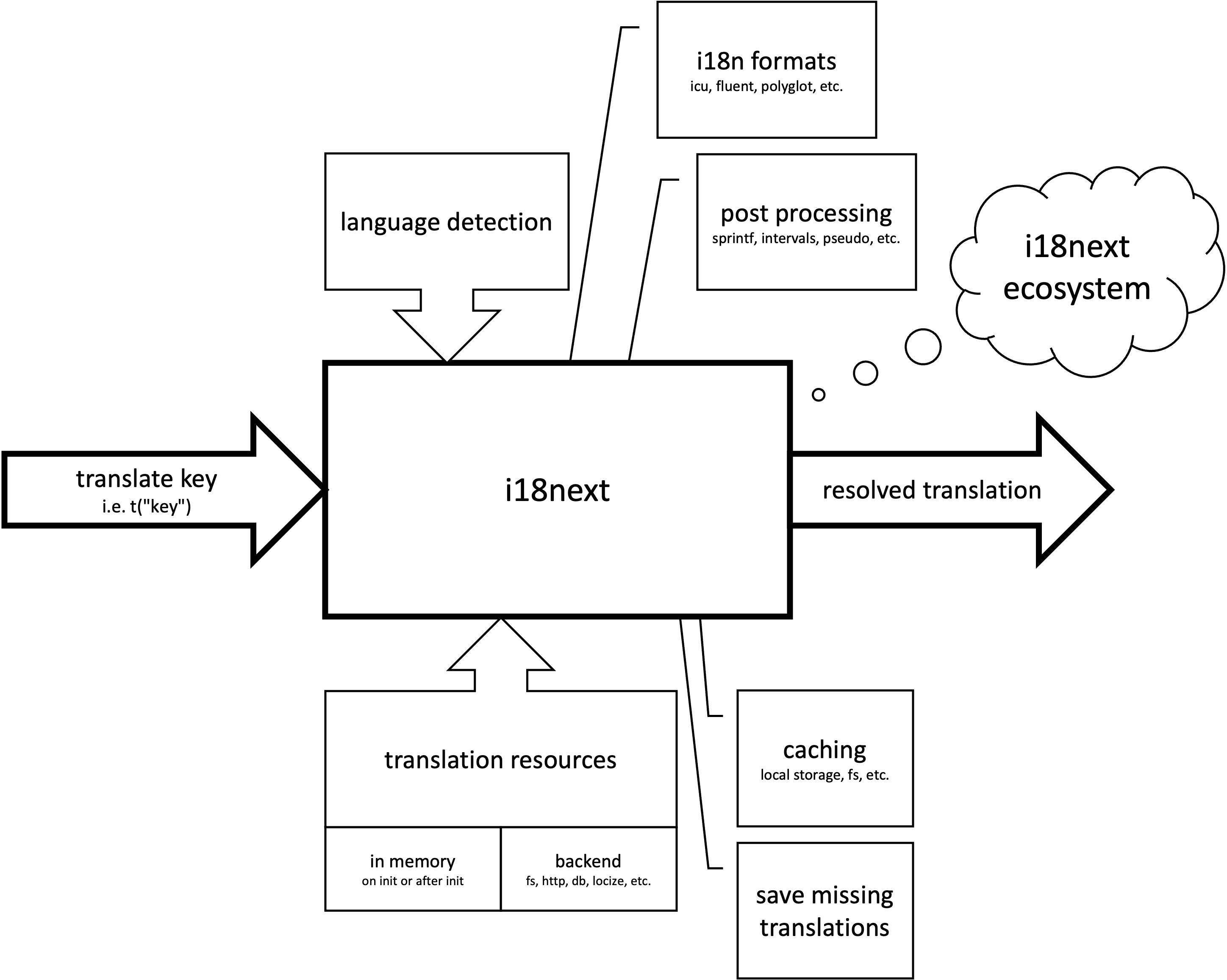
At first, i18next seems to be a simple key/translation dictionary, but in reality it is an elaborated and very extensible i18n framework with a lot of power. It offers translations to be provided from different sources, language detection, plural form resolutions, caching, post processing, alternative i18n formats and more.
The creators of i18next are also the founders of Locize
The i18next community provided us with great feedback. Out of that response and our own experiences we learnt providing instrumentation for doing proper internationalization just is not enough.
Helping developers get applications translated is great, but there is more to it:
- How do you integrate translation services / agencies?
- How do you keep track of new or removed content?
- How do you handle proper versioning?
- How do you deploy translation changes without deploying your complete application?
Locize to the rescue
Having created the foundation with i18next it was a long journey to localization as a service.
- Easy to integrate
- Continuous localization
- Continuous localization with a CDN
- Manage translation files with ease
- Free plan & transparent pricing
Locize is the perfect translation management tool for your i18next project.
➡️ i18next + Locize = true continuous localization
New to i18next?
Get a quick introduction and learn the core concepts before wiring it into your app.
Already using i18next?
Then the Locize integration will be a breeze and you will manage your translation files with ease.
Just use i18next-locize-backend as i18next backend
Configure the backend once and pull translations directly from Locize.
import i18next from 'i18next';
import Backend from 'i18next-locize-backend';

i18next
  .use(Backend)
  .init({
    // ...other options
    backend: {
      projectId: '[PROJECT_ID]'
      apiKey: '[API_KEY]'
      cdnType: 'standard' // or cdnType: 'pro'
    }
  });
Next steps
- Framework-by-framework setup: JavaScript localization guide
- Explore automation and workflows on For your team
- See file-based and API options on How it works
- Check AI translation options on AI
Which technology are you using
Practical pointers to get the best i18next + Locize workflow.