
What is Software Localization?
Software localization is the process of adapting a software product (text, UI, formats, and cultural expectations) for a specific language and market. It is broader than translation, which only converts words: localization also adapts date and currency formats, images and gestures, reading direction (LTR/RTL), and legal compliance. It is also different from internationalization (i18n), which is the engineering work of preparing code to support any language. Localization is the market-by-market work that comes after i18n, and it is the difference between a product that is usable in a target market and one that feels foreign there. The global market for software localization generated $5.9 billion in revenue in 2022 and is projected to reach $15.6 billion by 2032, reflecting how essential it has become for any product targeting more than one country.
- What it is: adapting a software product (text + UI + formats + culture) for a target market
- vs translation: translation = words; localization = whole experience
- vs internationalization (i18n): i18n = engineering preparation; l10n = market-by-market adaptation. i18n always comes first
- What it covers: language, date/time/number/currency formats, images, gestures, layout direction (LTR/RTL), legal compliance
- Workflow types: waterfall (linear, batch) or continuous (parallel with development)
- Conversion impact: 40% of consumers never buy from a non-native-language site (CSA Research)
Since the COVID-19 pandemic, as businesses shifted operations online and broadened their global reach, software localization has become even more important. It can be an expensive process, especially for small and medium-sized businesses (SMEs) with tight budgets, and it takes time and resources to ensure high-quality results. The rest of this guide explains how it works, what workflows exist, and how to implement it step by step.
What is software localization?
Software localization helps to adapt software to the language and circumstances of the target market while retaining its originality.
That means it’s not only the text being adapted into the relevant language, but also the design and overall user experience (UX) being amended so it meets the needs of the target audience.
While internationalization (i18n) is about developing a product to meet the demands of multiple cultures/audiences, software localization is the deeper, market-by-market adaptation.
For example, localizing software from English into Chinese isn’t “just translating wording”: the length of text and symbols can be entirely different, meaning the visual layout often needs to be adjusted to keep the UX consistent.
Software localization also looks at:
- Resources and links
- Time and date formats
- Currency/number formats
- Use of images or gestures (cultural appropriateness)
- Reading direction (LTR/RTL)
This makes the process complex and time-consuming, but it can be a worthwhile investment.
How does localization take place?
Software can be localized in two core areas: internationalization first, then localization.
Internationalization (design & development)
The internationalization phase covers design and development, which means you should:
- Review your application framework to ensure it can support your requirements
- Plan your content (including how much space translated text will require)
- Incorporate localization needs into design, making localization more effective
- Code your strings to allow expansion when required
- Externalize any strings that have been prepared for localization
Localization (translation + adaptation + testing)
Once you’ve successfully completed the internationalization phase, you begin the localization phase:
- Translate your content (ideally with a skilled translator)
- Review everything (accuracy, language quality, terminology)
- Copy translations into your software
- Test in every locale you’re targeting
Once you’re confident the localized software works as designed and is free from bugs, it can be released.
Waterfall vs continuous localization
For localization of software there are different workflows.
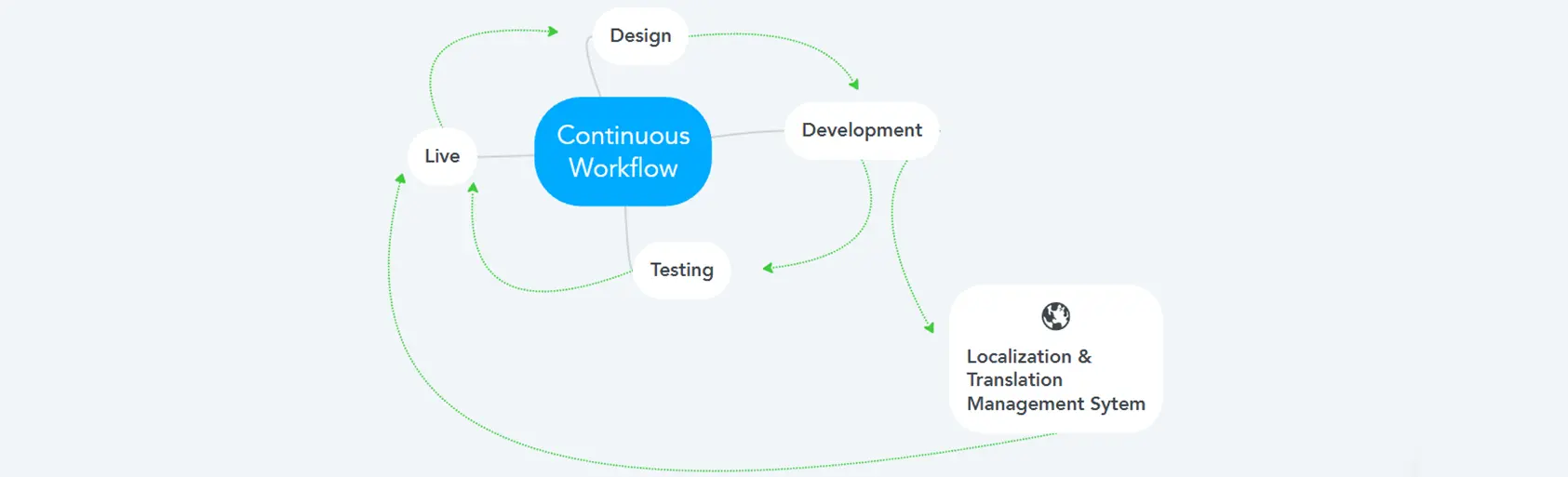
The traditional approach breaks down activities into linear sequential phases, the so-called waterfall workflow.

Continuous software localization combines software development and localization into one process so that developers work in parallel with the localization team from the very beginning:
How does software localization differ from pure text translation?
Pure text translation simply translates words from one language to another.
Software localization takes a more comprehensive approach that includes cultural, regional, and functional adaptations to seamlessly integrate the product into the target market.
This means that localization involves not only translating the text, but also adapting elements such as date formats, currencies, images, colors, and sometimes even the user interface. Cultural nuances are also taken into account, such as text length and reading direction.
What are the risks of neglecting cultural adaptations during localization?
Neglecting cultural adaptations can damage a brand’s image through unintended insults or misunderstandings and can lead to a loss of credibility and customer trust.
Other dangers include legal problems due to non-compliance with local regulations (like data protection laws), reduced user acceptance (higher abandonment rates, negative reviews), and an unsuccessful market entry.
In extreme cases, massive reputation damage can occur if, for example, offensive gestures are published out of ignorance.
What advantages does localization offer e-commerce companies in particular?
For e-commerce companies, software localization facilitates access to new markets and increases conversion rates.
Customers can shop in their native language and with culturally adapted content, which strengthens trust and increases willingness to buy.
Software localization can also improve customer satisfaction through localized experiences (local payment methods, product descriptions), provide a competitive edge through better local SEO, and reduce returns.
Do I need professional translators, or is machine translation enough?
Whether you need a professional translator or whether machine translation tools (like Google Translate) are sufficient depends on the context.
However, professional translators are usually essential for high-quality software localization because they account for nuance, cultural context, and technical terminology.
Machine translation is useful for quick, rough translations and scalability, but for complex content it can introduce tone issues, idiom mistakes, or cultural sensitivities.
A common approach is using machine translation plus human post-editing.
Why localization of software is important
Technology has connected the world: users can discover and use software globally. But understanding local expectations, language nuance, and cultural differences is crucial.
Globalization gives software developers access to hundreds of millions of potential new customers, and to succeed, they need to offer a great user experience everywhere.
Benefits include:
- Maximizing your sales: Success on an international scale becomes possible.
- Improving user experience: Users can clearly understand the product and get the most out of it.
- Staying ahead of competitors: Better experiences reduce churn and help attract more customers.
- Enhancing feedback: More engaged users means more feedback and more ideas.

9 steps to successfully implement software localization
This guide walks through essential steps to implement software localization, whether you’re a startup or an enterprise.
- Assessment and planning
Choose the languages and markets you want to target. Check if your software is localization-ready:
- Is your code dependable and bug-free?
- Has your main language UI been put into place?
- Is your text in the main language complete?
- Is your character encoding correct?
- Translation
Choose professional translators or translation software. Maintain context and accuracy.
A professional translation management system can integrate translation services and improve delivery reliability while reducing manual errors.
- Visual elements / graphic design
Customize visuals to align with local preferences and respect cultural norms.
Consider a style guide (branding, tone of voice, formality) to ensure consistency.
- Compliance with legal and regulatory requirements
Ensure compliance with local laws (data privacy, accessibility, industry regulations).
Examples include GDPR and WCAG.
- Testing
Test localized software for functionality and display; fix issues.
- Quality assurance (QA)
Establish a QA process for localized versions and address found bugs.
- Documentation and support
Translate documentation and support materials; offer localized support.
- Release and distribution
Prepare localized versions for distribution; update marketing materials.
- Maintenance and updates
Regularly update localized versions while maintaining quality.
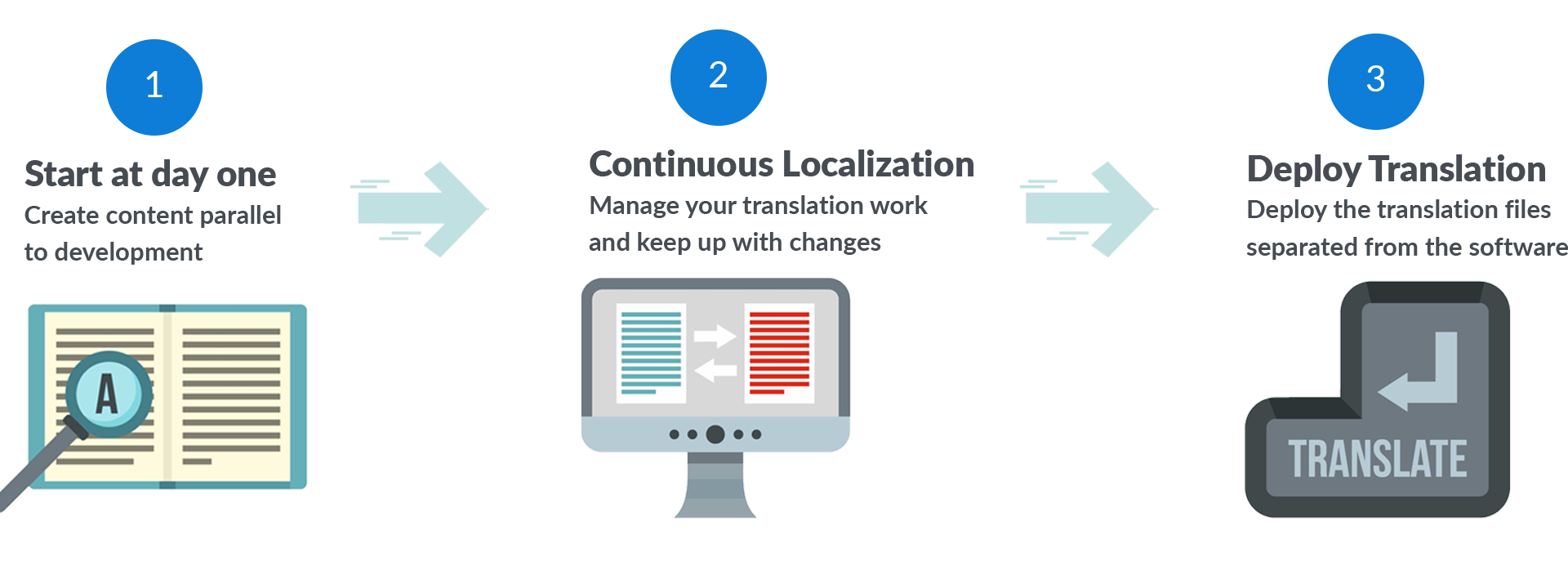
Treat localization as an extension of software development. Instead of doing it only at the end, incorporate it throughout development.
Use a localization platform
Effective software localization is a large project. Using a localization management platform can simplify the process. Which one fits depends on your stack and workflow; we compare the main options in best localization platforms for developer teams.
For example, React localization becomes much easier for developers when used with the i18next framework.
You can use Locize to make the localization process easier across your company. Locize is a platform for localizing your website, mobile app, video game, or any other digital product. See how it applies to a software localization service or website localization services.
Who needs software localization?
If your software targets only one specific region, localization might not be required.
But if you want to expand to new markets (now or later), localization is worth considering, and preparation during development helps.
Software localization should be a major consideration for those working in e-commerce, legal, or governmental sectors.
You’ll definitely need it when:
- Your business plan targets multiple regions (or is region-specific)
- You’re developing your software right now (it’s easier to take care of localization at this stage)
- You have a many-to-many business model and are planning to grow exponentially
These types of developers should take care of localization:
Web developers
Develop code for websites and web applications.
SaaS or cloud developers
Build cloud-based applications for end users.
Desktop application developers
Write software applications that run natively on operating systems.
Virtual reality application developers
Create and test applications for VR/metaverse.
Mobile app developers
Develop applications for smartphones and mobile devices.
Video game developers
Turn game concepts into playable reality.
Blockchain developers
Enable secure digital transactions by building blockchain systems.
Integration developers
Own the full life cycle of information systems.
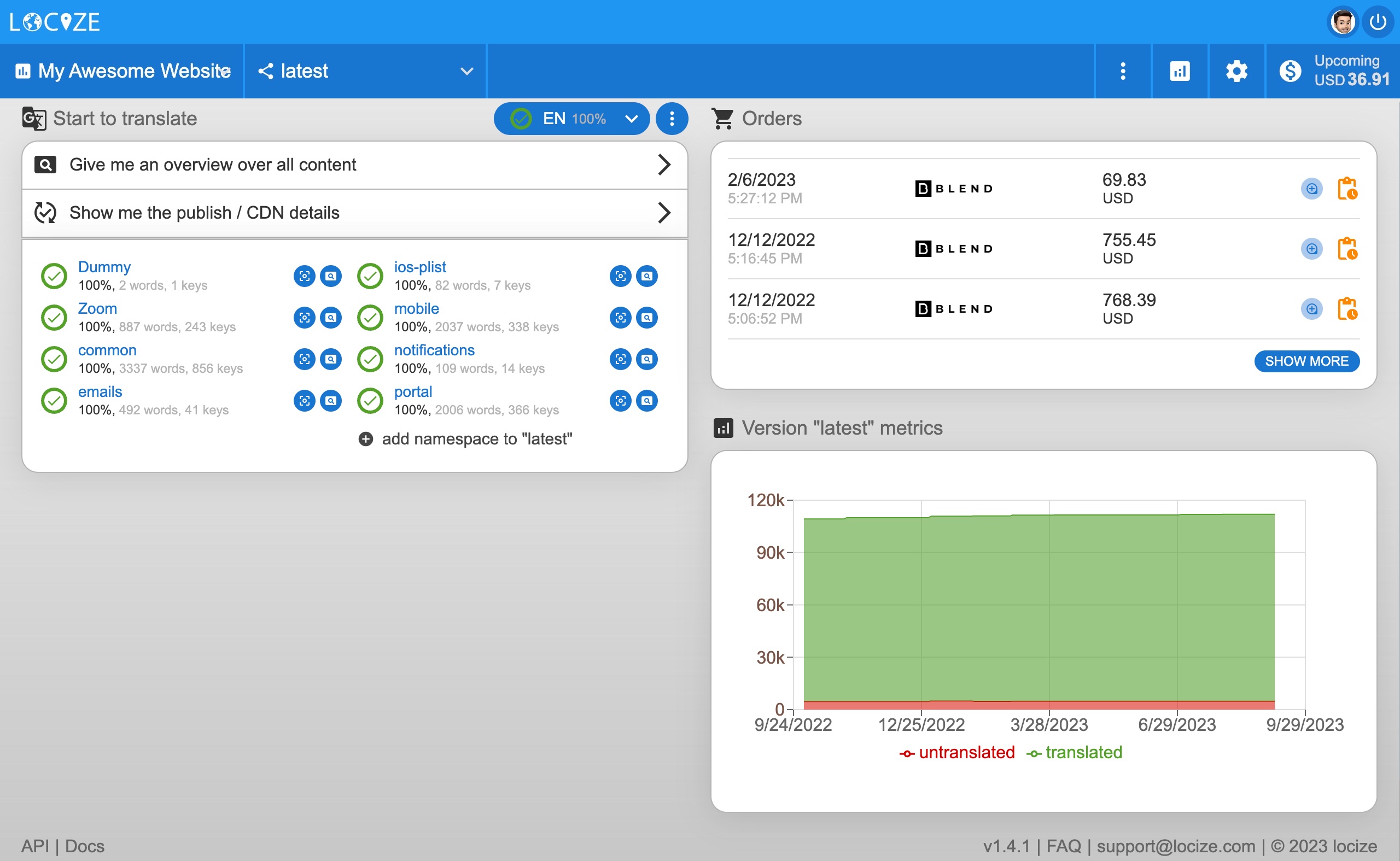
Connect your project directly to Locize and automatically send new “non-translated” parts of your application to Locize.
You can use Locize CDN translations or translate within your web application directly.
All newly generated keys in the reference language can also be automatically translated into target languages using machine translation.
Frequently Asked Questions
Software localization is the process of adapting a software product for a specific language and market. It goes beyond translating text: it adapts UI layout, date and number formats, currencies, images, gestures, and reading direction (LTR/RTL) so the product feels native to its target audience. Localization is what comes after internationalization (i18n), which is the engineering work of preparing the code to support any language.
Translation converts text from one language to another. Software localization adapts the entire product: text plus formats (date, time, currency, number), images, colors, layout, RTL support, legal compliance, and cultural references. Translation makes the words understandable; localization makes the product feel native. Translation is one part of localization.
Internationalization (i18n) is the engineering work that prepares software so it can support any language: extracting strings into resource files, using locale-aware formatting (Intl), supporting Unicode, handling pluralization, and accommodating RTL layouts. Localization (l10n) is the per-market adaptation that follows: translating strings, adapting images and currencies, complying with local laws. i18n always comes first; l10n is impossible without it.
They overlap heavily. Website localization is software localization applied specifically to websites: content, layout, SEO, and regional metadata. Software localization is the broader category and includes desktop apps, mobile apps, SaaS products, video games, and embedded systems. Many websites are technically software (single-page apps, SaaS dashboards), so the same i18n / TMS / CDN tooling applies to both.
CSA Research found that 40% of consumers will never buy from a website not in their native language, and 75% are more likely to repurchase if support is in their language. Localized software materially increases conversion, reduces support load, expands the addressable market, and builds trust. For most products targeting more than one country, localization is the difference between being usable and being irrelevant.
A typical workflow: (1) prepare the codebase with internationalization (extract strings, use locale-aware formatting, support Unicode and RTL); (2) choose target languages and markets; (3) translate, ideally using a translation management system (TMS) with translation memory and glossary; (4) adapt images, currencies, and cultural references; (5) test in every locale, including layout under longer translated text; (6) ship and maintain. Treat localization as a continuous process, not a one-time release task.
Machine translation (DeepL, Google Translate, modern AI) is good for general comprehension and first drafts but typically falls short on idiomatic, technical, marketing, and culturally sensitive content. The current best practice is hybrid: machine translation produces the first draft, human translators or post-editors review for accuracy, tone, and brand voice. A translation management system makes this hybrid workflow practical at scale.
Now we want to turn it over to you: do you plan to invest in software localization?
If you have questions, reach out at support@locize.com.
Register for a 14-day free trial: www.locize.app/register